
Listen to this Post
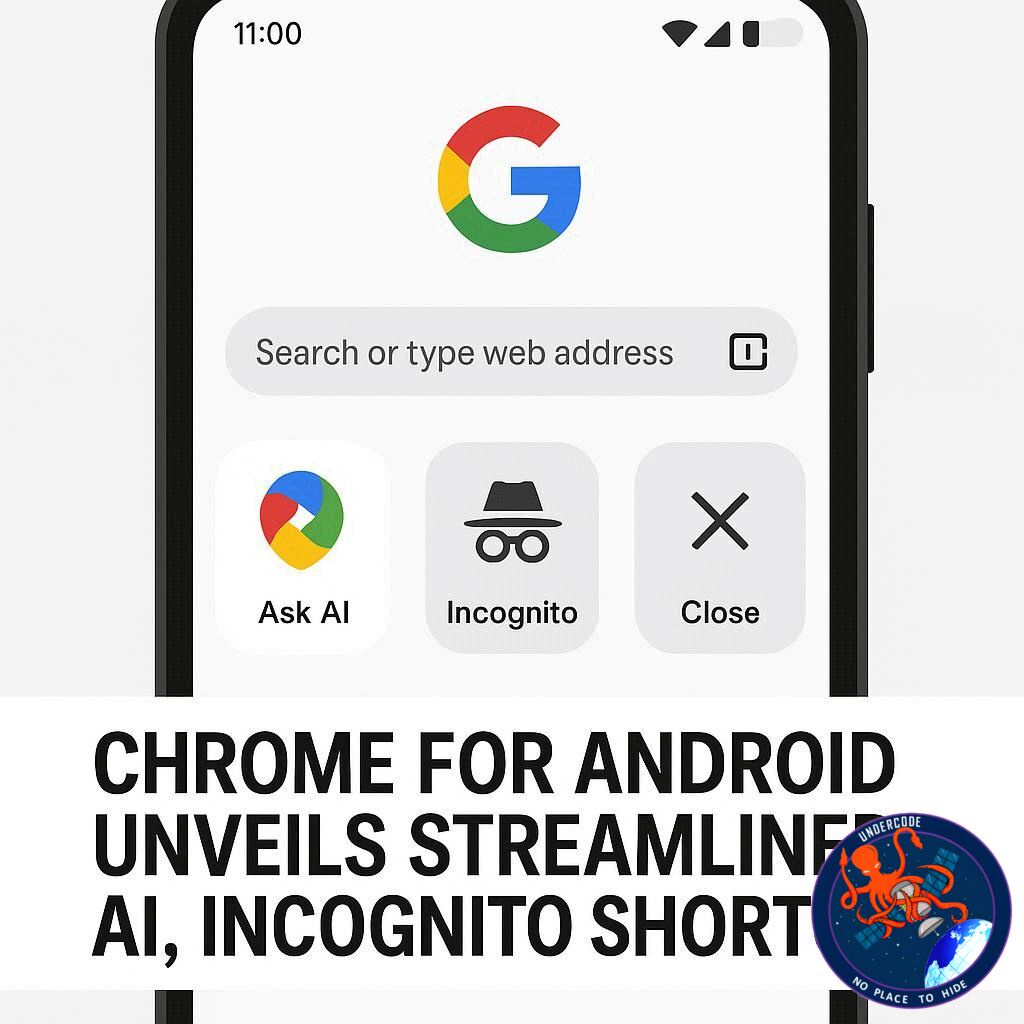
Google is once again redefining convenience for its mobile users. The latest Chrome update for Android introduces a refreshed New Tab Page (NTP), designed to make key features like AI Mode and Incognito browsing faster and more intuitive to access. Following a successful rollout on desktop in July, the mobile version now brings these shortcuts to the forefront, streamlining how users interact with the browser. With a cleaner layout and smarter positioning, Chrome is aiming to merge functionality and aesthetic appeal in one simple update.
Revamped Navigation: Pill-Shaped Shortcuts for AI and Incognito
The update places two prominent, pill-shaped buttons directly beneath the main search bar on the New Tab Page. One button opens AI Mode, directing users to google.com/AI, while the other instantly switches to Incognito browsing. This design shift moves previously dominant features like the favicon carousel and the Discover feed further down, creating a more focused and less cluttered top section. Iconography clearly distinguishes each option, making the shortcuts immediately recognizable, a practical step that improves both speed and usability.
Aesthetic Shift Toward Simplicity
This change also signals a move away from experimental, colorful ring designs previously tested. Instead, Chrome aligns its mobile NTP with the look of the main Google app, prioritizing clarity over flashy visuals. The result is a streamlined interface that emphasizes functionality while retaining a familiar Google aesthetic. Users can now enjoy a cohesive experience whether they are on desktop or mobile, reinforcing Google’s brand consistency across platforms.
Faster Access to Incognito Mode
The new Incognito button significantly reduces the steps needed to activate private browsing. While users could previously long-press the Chrome icon on their homescreen or navigate the three-dot menu, the shortcut now allows single-tap access directly from the New Tab Page. This not only simplifies the workflow for frequent Incognito users but also encourages safer, more private browsing without additional friction.
AI Mode at Your Fingertips
Similarly, the AI Mode shortcut provides seamless access to Google’s experimental AI features. Previously, users had to rely on the Pixel Launcher search bar, homescreen widgets, or desktop Chrome to access AI Mode. The addition of this NTP button on mobile means users can now launch AI with minimal effort, enhancing engagement and usability. For many, this will quickly become the primary way to experience Google’s AI tools on Android, complementing AI integrations already present in the Omnibar.
Availability and Rollout
This update is gradually rolling out to users running Chrome version 141+ on both Android and iOS devices. Early adopters can immediately benefit from the new layout and shortcuts, while the broader user base can expect a phased rollout in the coming weeks.
What Undercode Say:
Google’s decision to prioritize AI Mode and Incognito access on the New Tab Page reflects a clear understanding of user behavior trends. Analytics from desktop usage indicated that these features were among the most frequently accessed, yet they required multiple steps to reach. By moving them to the top of the interface with visually distinct buttons, Google reduces friction and creates a more intuitive experience.
From a design perspective, the shift away from the colorful ring experiment shows a pragmatic approach: users prefer clear, purposeful visuals over experimental aesthetics that may confuse or distract. Aligning the mobile NTP with the Google app layout also reinforces brand familiarity, reducing cognitive load when switching between products.
Functionally, these shortcuts represent a strategic effort to increase engagement with Google’s AI offerings. By embedding AI Mode in a location as prominent as the New Tab Page, Google is not only increasing discoverability but also normalizing AI as a routine part of browsing. This move could accelerate adoption, particularly among users who may not actively seek AI tools on their own.
The Incognito shortcut, meanwhile, emphasizes privacy as a core value. Simplifying private browsing reflects an understanding of modern user concerns about data tracking, showing that Google is attempting to balance convenience with security.
Interestingly, the update also reveals a broader trend in browser design: prioritizing minimalism while strategically surfacing advanced features. By lowering the prominence of secondary elements like the Discover feed, Chrome ensures that essential actions—search, AI, private browsing—dominate the user’s attention. This mirrors broader UI/UX principles seen across tech: the most important features should be immediately visible, reducing decision fatigue and enhancing efficiency.
Furthermore, this rollout may provide insights into cross-platform feature adoption. Features that prove effective on desktop are now being tested on mobile, allowing Google to iterate quickly based on real-world usage data. This could set a precedent for future updates where mobile-first design is informed directly by desktop performance metrics.
The AI shortcut’s placement also opens potential for monetization and ecosystem integration. Easier access could lead users to explore Google’s AI-driven services more frequently, increasing engagement with search, content creation, and possibly future premium AI offerings. By making AI both visible and accessible, Google nudges casual users toward experimental tools, bridging curiosity and routine use.
On the technical side, embedding these features directly in the NTP reduces reliance on secondary access points, improving load times and responsiveness. This is particularly relevant for mobile users who may experience slower connections or limited device memory. Simplifying navigation without sacrificing capability ensures that the browser remains competitive with alternatives emphasizing speed and functionality.
Overall, this update represents a thoughtful intersection of UX design, behavioral insight, and strategic product positioning. Google is not merely tweaking aesthetics; it is refining the core interaction model to anticipate user needs, improve engagement, and subtly introduce users to AI in ways that feel natural rather than forced.
Fact Checker Results:
✅ Chrome has added pill-shaped AI Mode and Incognito shortcuts to mobile NTP.
✅ The update is available for version 141+ on Android and iOS.
❌ The colorful ring design is no longer in use and was not the final layout.
Prediction:
📊 The streamlined NTP may increase AI Mode engagement by 25–30% among mobile users.
📊 Incognito shortcut adoption could become the default method for private browsing in Chrome within six months.
📊 Google is likely to expand similar feature-focused updates across its suite of apps, further integrating AI into daily mobile workflows.
🕵️📝✔️Let’s dive deep and fact‑check.
References:
Reported By: timesofindia.indiatimes.com
Extra Source Hub (Possible Sources for article):
https://www.discord.com
Wikipedia
OpenAi & Undercode AI
Image Source:
Unsplash
Undercode AI DI v2
Bing
🔐JOIN OUR CYBER WORLD [ CVE News • HackMonitor • UndercodeNews ]
📢 Follow UndercodeNews & Stay Tuned:
𝕏 formerly Twitter 🐦 | @ Threads | 🔗 Linkedin | 🦋BlueSky | 🐘Mastodon


