
Listen to this Post
Introduction: A Slow but Visible Evolution of Windows 11
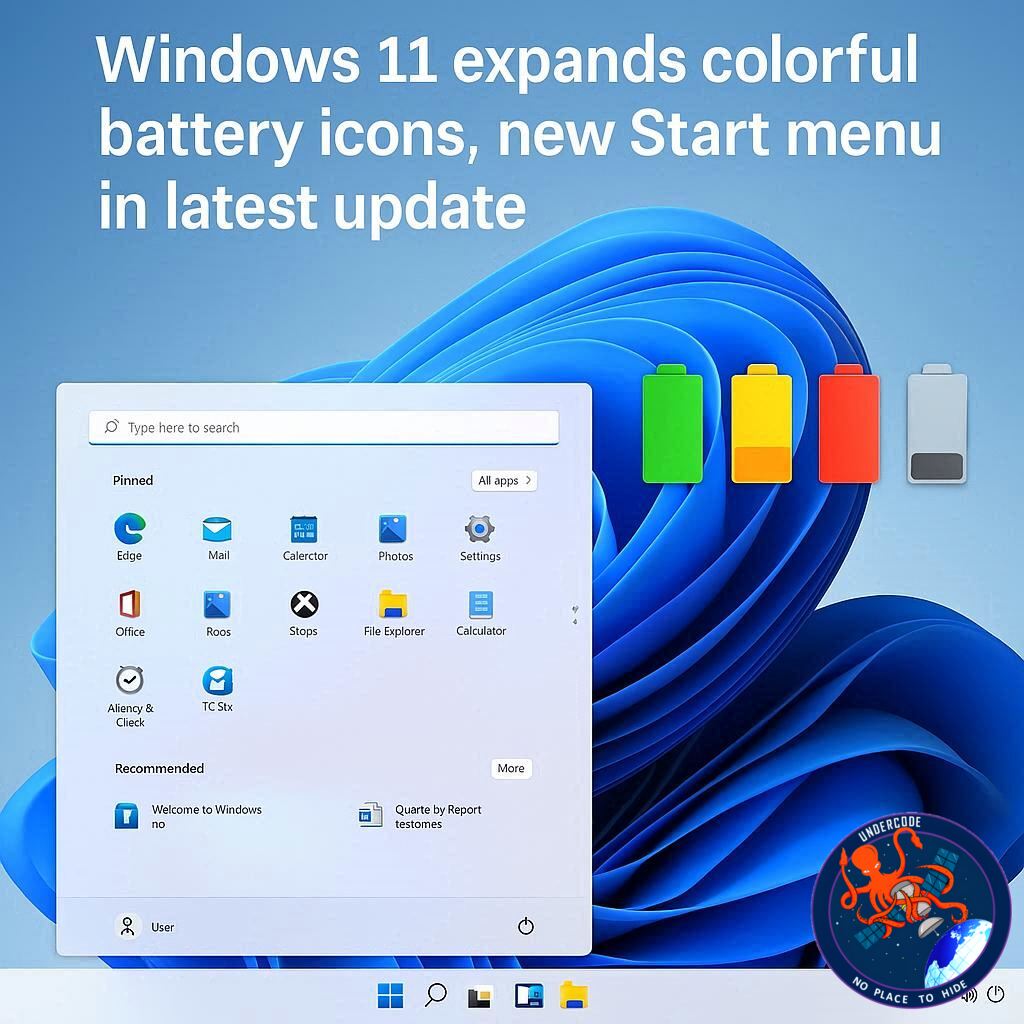
Microsoft continues its cautious and methodical rollout of new Windows 11 features, and the latest changes finally suggest broader availability. After years of limited testing, the redesigned colorful battery icons on the taskbar are now reaching more users. Alongside this visual refresh, the long-awaited new Start menu is also expanding its presence. These changes are tied closely to the optional update Windows 11 KB5077241, which appears to unlock several features that were previously restricted to small test groups.
Microsoft Confirms Wider Availability of Taskbar Battery Icons
For users tracking Windows 11 development, the battery icon redesign has been a long time coming. Windows 11 has been testing these colorful indicators for nearly two years, with early prototypes appearing as far back as late 2024. Despite being technically ready, the icons remained unavailable to many PCs due to Microsoft’s phased deployment strategy.
Windows 11 KB5077241 Brings Features to More Devices
According to Microsoft, the optional February 2026 update KB5077241 significantly expands access to the updated battery icons and the redesigned Start menu. This update does not guarantee immediate activation for every PC, but it increases the likelihood that eligible systems will finally see the changes.
The Role of the “Get the Latest Updates” Toggle
Users who want faster access to new features can enable the “Get the latest updates as soon as they’re available” option in Windows Update. This setting does not override Microsoft’s A/B testing system, but it does place your device earlier in the rollout queue compared to systems with the toggle disabled.
First Impressions of the New Battery Icons
After installing KB5077241, the battery icon on the taskbar looks noticeably different. The plain white bar has been replaced with a more expressive design that communicates battery status at a glance. The icon is larger, clearer, and easier to interpret without hovering or opening settings.
Charging Status Is Now Instantly Clear
When your device is plugged in, the battery icon turns green and displays a charging bolt symbol. This removes any ambiguity about whether the system is actively charging, a small but meaningful usability improvement for laptops and tablets.
Color Changes Based on Battery Levels
When unplugged, the battery icon reverts to white under normal conditions. Once the battery drops to 30 percent, energy saver mode activates automatically and the icon shifts to orange. This color change can also be triggered manually by enabling energy saver from system settings.
Critical Battery Warnings Are More Visible
At dangerously low levels, specifically below 6 percent, the battery icon turns red. This visual alert is far more noticeable than the previous design and reduces the chance of unexpected shutdowns.
Battery Percentage Finally Comes to the Taskbar
Another welcome improvement is the option to display battery percentage directly on the taskbar. Users can enable this by navigating to Settings, then System, then Power and Battery, and switching on the “Battery percentage” option.
The Taskbar’s Gradual Comeback
Over the past several months, the Windows 11 taskbar has seen steady improvements. While many of these features existed in earlier versions of Windows, their return marks a course correction after the operating system’s controversial launch.
Drag and Drop Makes a Return
Microsoft has restored the ability to drag and drop files directly onto taskbar icons, a feature heavily criticized when it was initially removed. This change significantly improves everyday workflow efficiency.
Smarter Behavior in Crowded Taskbars
The taskbar can now automatically resize icons when space becomes limited, making it easier to manage multiple pinned and active applications on smaller displays.
Taskbar Movement May Be Next
Credible reports suggest that Microsoft is preparing to allow users to reposition the taskbar once again. If implemented, this would address one of the most persistent complaints from long-time Windows users.
Secure Boot Certificates Quietly Roll Out
Beyond visual changes, KB5077241 also plays a role in system security. Secure Boot certificates that are set to expire in June 2026 are now being replaced on more devices as part of a behind-the-scenes update.
Microsoft Confirms Certificate Replacement
Microsoft has confirmed that new Secure Boot certificates issued in 2023 are being deployed to consumer PCs. This update is essential for maintaining system integrity and compatibility with future security requirements.
How Users Can Verify Certificate Updates
Advanced users can check whether the new certificates are installed by using Event Viewer or running a PowerShell script. While this process is technical, Microsoft has published guidance to assist those who want confirmation.
No Need to Panic If You Don’t See Changes
If your system has not yet received the new certificates, there is no immediate risk. Microsoft has committed to completing the rollout across all supported PCs before the June 2026 deadline.
Feature Rollouts Remain Inconsistent
Some users report receiving the new Start menu and battery icons without the updated Secure Boot certificates, while others experience the opposite. This inconsistency reflects Microsoft’s ongoing reliance on staggered deployments.
What Undercode Say: Why Microsoft Moves This Way
Microsoft’s slow rollout strategy is frustrating, but it is rooted in risk management. By releasing features gradually, the company minimizes the chance of widespread bugs affecting millions of devices at once.
A/B Testing Shapes the Windows Experience
Windows 11 increasingly behaves like a live service rather than a static operating system. A/B testing allows Microsoft to gather real-world telemetry before committing changes globally, even if it leaves users confused.
Visual Feedback Improves Everyday Usability
The colorful battery icons may seem minor, but they represent a shift toward clearer visual communication. Users no longer need to interpret vague symbols or rely on percentages hidden behind menus.
Battery Awareness Matters More Than Ever
With laptops dominating the PC market, battery health and awareness are critical. These changes suggest Microsoft is prioritizing mobile-first usability, even if progress feels slow.
The Start Menu Still Faces Skepticism
While the new Start menu is expanding, it remains controversial. Some users welcome its modern layout, while others feel it still lacks the flexibility of earlier Windows versions.
Incremental Improvements Add Up
Individually, these updates feel small. Collectively, they signal that Windows 11 is finally maturing into a more complete and user-friendly platform.
Security Updates Are Just as Important as Visual Ones
The Secure Boot certificate refresh highlights Microsoft’s dual focus on appearance and protection. Silent security updates may not grab attention, but they are essential for long-term stability.
Microsoft Is Correcting Its Own Missteps
Many of these improvements restore features that should never have been removed. Still, acknowledging mistakes and fixing them matters more than pretending they never happened.
Windows 11 Is Still a Work in Progress
Nearly five years after its introduction, Windows 11 continues to evolve. This pace may test patience, but it also suggests Microsoft is listening, even if reluctantly.
Fact Checker Results
✅ Microsoft confirmed wider rollout of colorful battery icons via KB5077241
✅ Battery percentage display is officially supported in Windows 11 settings
❌ Secure Boot certificate updates are not yet active on all PCs
Prediction
🔮 Microsoft will complete Secure Boot certificate deployment before June 2026
🔮 Taskbar repositioning options will return in a future Windows 11 update
🔮 Visual clarity improvements will continue as Windows 11 moves toward a mobile-first design
🕵️📝✔️Let’s dive deep and fact‑check.
References:
Reported By: www.windowslatest.com
Extra Source Hub (Possible Sources for article):
https://www.discord.com
Wikipedia
OpenAi & Undercode AI
Image Source:
Unsplash
Undercode AI DI v2
Bing
🔐JOIN OUR CYBER WORLD [ CVE News • HackMonitor • UndercodeNews ]
📢 Follow UndercodeNews & Stay Tuned:
𝕏 formerly Twitter 🐦 | @ Threads | 🔗 Linkedin | 🦋BlueSky | 🐘Mastodon


