
Listen to this Post
 Introduction: Why Most People Use Only 10% of Google Maps
For millions of users, Google Maps is a simple navigation app. Open it, type a destination, follow the blue line. Yet beneath that familiar interface lies a sophisticated ecosystem of controls, automation tools, privacy layers, and personalization features that most people never touch. After years of deep product evolution, Google Maps has quietly become more than a map. It is a predictive travel assistant, a battery manager, a privacy dashboard, an accessibility companion, and now even an AI-powered visual guide.
The difference between a casual user and a power user often comes down to hidden settings. Toggle the right switch, and your experience becomes faster, safer, more efficient, and more personal. Ignore them, and you are leaving significant functionality on the table. What follows is a comprehensive breakdown of the most powerful features buried inside Google Maps for iOS and Android, including advanced EV tools, traffic intelligence, offline navigation, privacy management, AR walking directions, and Gemini integration.
Master Summary: The Hidden Architecture of Google Maps Power Features
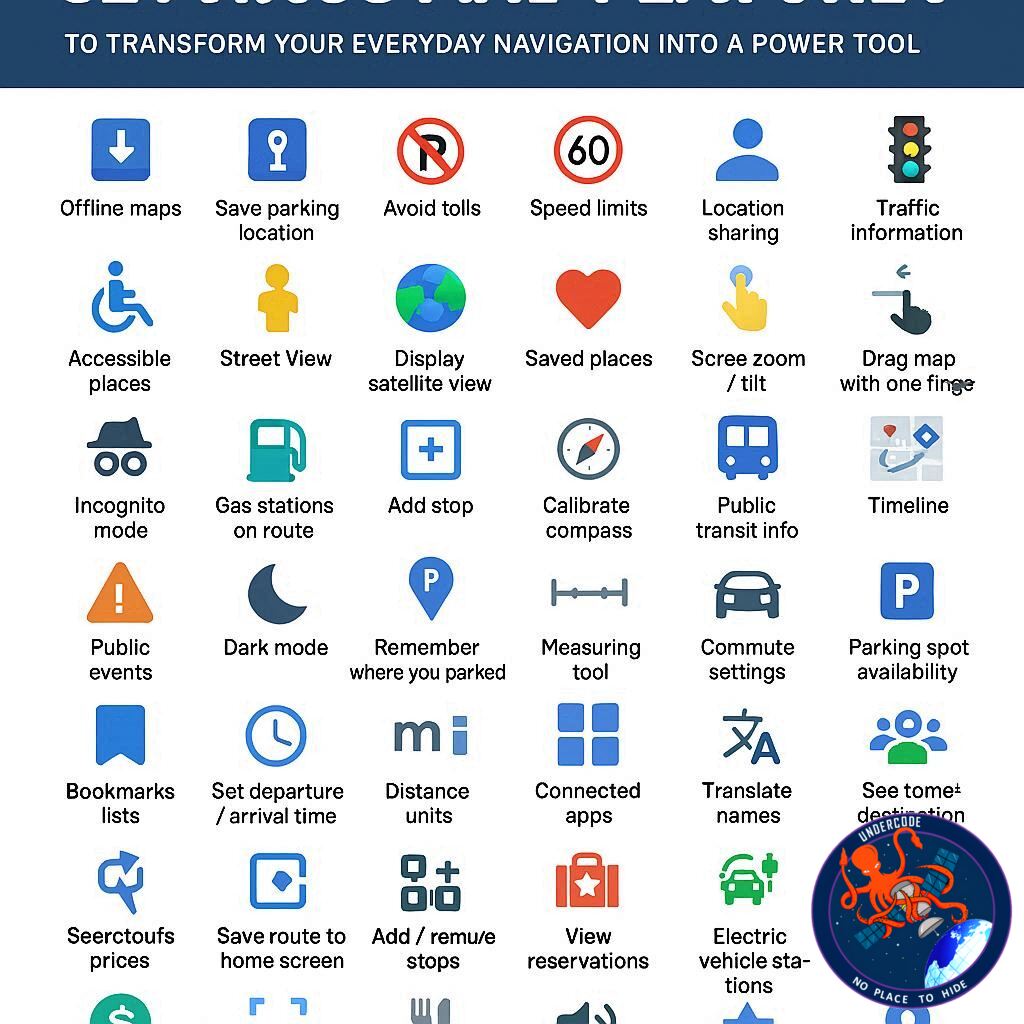
Google Maps offers dozens of customizable navigation settings that dramatically improve orientation, route optimization, and usability. Users can lock the map facing north to maintain spatial consistency, avoid tolls and highways by default, and prioritize fuel-efficient routes to save gas or reduce emissions. Vehicle customization goes deeper, allowing drivers to specify engine type and, in the case of electric vehicles, input precise model and charging plug details for smarter charging station filtering.
Multi-stop routing enables complex trips with reorderable destinations, while departure-time scheduling accounts for traffic fluctuations to deliver accurate arrival predictions. Built-in leave reminders remove the need for alarms by factoring real-time traffic conditions. Glanceable directions display turn-by-turn navigation on a locked screen, improving safety and battery efficiency.
Voice controls allow hands-free searching and rerouting, while power-saving mode reduces battery drain during long drives, currently optimized for select Pixel devices. Speed limits and speedometer overlays help prevent accidental speeding, and audio routing options give users control over Bluetooth interruptions. Adjustable guidance volume and detailed walking cues enhance accessibility and clarity.
Live View overlays AR directions using the camera, particularly helpful in dense cities or transit hubs. Accessibility enhancements highlight wheelchair-friendly locations and prioritize accessible transit routes. Transit mode preferences let users choose buses, trains, or subways for more relevant routing.
Personalization extends to vehicle avatars and navigation color schemes, including dark mode for night driving. Layer controls provide traffic visualization, satellite imagery, terrain maps, raised 3D buildings, air quality indicators, wildfire tracking, and Street View access. Unit customization supports distance and temperature preferences across regions.
Offline maps remain critical for areas with poor signal, allowing navigation without connectivity. Users can label private locations, save parking spots manually, and create shareable collections of favorite places. Saved trips and home or work addresses enable one-tap routing and predictive commute alerts.
Privacy features include Incognito Mode, Timeline controls, auto-delete settings, Web and App Activity management, and selective deletion of search history. Notifications can be extensively customized to reduce unwanted alerts. Real-time location sharing enhances safety coordination.
Street View historical imagery enables time travel through past captures, revealing how neighborhoods evolved. Finally, integration with Gemini AI through Lens allows users to point their camera at a building and receive contextual summaries powered by real-time scene analysis.
Together, these 41 features transform Google Maps from a simple GPS application into a fully integrated mobility intelligence platform.
What Undercode Say: The Strategic Evolution of Google Maps Into a Mobility Operating System
Google Maps is no longer competing solely with navigation apps. It is competing with mobility ecosystems. The addition of fuel-efficient routing and EV-specific filtering reflects a long-term alignment with global electrification trends. By allowing drivers to specify exact EV models and charging adapters, Google is positioning Maps as infrastructure-aware software, not just routing software. That distinction matters.
Fuel efficiency prioritization is not just about saving money. It is about data leverage. Google aggregates traffic patterns, elevation changes, and congestion trends at scale. Suggesting an efficient route becomes a subtle behavioral nudge toward sustainable travel. That quietly reinforces environmental branding while strengthening Google’s traffic data dominance.
The offline map functionality reveals another strategic layer. In areas with poor signal, competitors often struggle. By offering downloadable regional maps that function for up to a year, Google retains user dependency even without connectivity. This ensures the platform remains central in rural and international travel scenarios.
Privacy tools such as Incognito Mode and Timeline auto-delete address growing regulatory and public scrutiny. Rather than eliminating tracking capabilities, Google reframes control as a user choice. This creates perceived transparency while preserving opt-in data streams for those who prioritize convenience over anonymity.
Accessibility enhancements represent another competitive differentiator. Wheelchair-friendly transit routes and landmark-based walking instructions are not surface-level additions. They demonstrate algorithmic sensitivity to real-world constraints, improving inclusion while increasing platform stickiness among users with mobility needs.
Live View and AR overlays push Maps beyond two-dimensional navigation. By merging camera input with GPS and spatial recognition, Google bridges digital mapping with physical space. This is an early indicator of spatial computing integration. As wearable AR devices mature, this functionality may migrate from phone screens to glasses, further embedding Maps into everyday life.
The integration of Gemini AI marks a philosophical shift. Traditional search within Maps required explicit queries. With AI-powered visual recognition, context becomes the input. Pointing a camera at a building and asking a question removes friction between curiosity and information. This transforms Maps into a real-time urban intelligence tool.
Battery-saving mode being initially limited to Pixel devices suggests hardware-software ecosystem integration. Exclusive features encourage brand loyalty while testing performance at controlled scale before broader rollout.
Customization features such as vehicle avatars, dark mode, and map orientation might seem cosmetic. In reality, they reinforce habitual usage. The more personal the interface feels, the harder it becomes to switch platforms.
Perhaps the most underestimated feature is multi-stop routing combined with time-based departure modeling. This shifts Maps from reactive navigation to predictive logistics planning. For professionals managing errands, deliveries, or client visits, this functionality edges toward lightweight route management software.
Google Maps has evolved into something closer to a mobility operating system. It manages data layers, predicts behavior, integrates AI, respects privacy preferences, and adapts to emerging transportation technologies. The user who activates only the default settings experiences a fraction of its capability.
The power user who understands these hidden controls gains efficiency, precision, and strategic advantage in everyday movement.
Fact Checker Results
✅ Google Maps supports EV model-specific charging station filtering and plug customization.
✅ Incognito Mode prevents searches and navigation history from being saved to a Google account.
❌ Power-saving mode is not universally available across all Android and iOS devices; it is currently limited to select Pixel models.
Prediction
🚗 AI-driven route prediction will become proactive, suggesting trips before users search based on behavioral patterns.
🕶️ AR navigation will expand beyond smartphones into wearable spatial devices.
🔋 EV integration will deepen, potentially incorporating real-time battery diagnostics and smart charging reservations within Maps.
▶️ Related Video (78% Match):
🕵️📝✔️Let’s dive deep and fact‑check.
References:
Reported By: www.zdnet.com
Extra Source Hub (Possible Sources for article):
https://www.twitter.com
Wikipedia
OpenAi & Undercode AI
Image Source:
Unsplash
Undercode AI DI v2
Bing
🔐JOIN OUR CYBER WORLD [ CVE News • HackMonitor • UndercodeNews ]
📢 Follow UndercodeNews & Stay Tuned:
𝕏 formerly Twitter 🐦 | @ Threads | 🔗 Linkedin | 🦋BlueSky | 🐘Mastodon


